August 2025
Column calculations, criteria for roles, read/unread & a lot more
Data analytics with column calculations
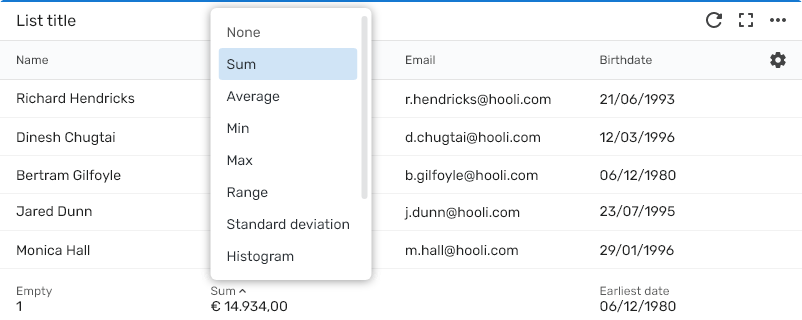
Your list widgets just got a lot more powerful with the option to enable dynamic column calculations. These calculations offer tailored results based on the field type. Whether it’s summing up numeric data for financial insights or identifying the earliest date in a list of tasks, key insights are now always within reach. Just head to the widget menu and enable the “Summary” option.
Each field type comes with its own set of calculation options. Below are just a few examples, but you’ll definitely want to explore them all:
- Numeric field: sum, average, min/max, standard deviation, and more
- Date fields: earliest/latest date, time ranges in days, weeks, or months
- All field types: filled, empty, unique - all three shown as counts or percentages
And because you can enable it per list widget, your view stays clean and focused wherever needed.
Criteria-based access control for roles
Once a role has been granted read access to a field in an item (like a task, lead, or customer), that role can view that field in every item created under that object. But what if you only want users to see some items?
With this new feature, you can now define exactly which items a role has access to using dynamic criteria. This makes it easier than ever to implement the Principle of Least Privilege (POLP) more effectively.
For example, a contract manager can now only see companies where they are listed as the contract manager, and only the related contracts from those companies.
Know what's new at a glance
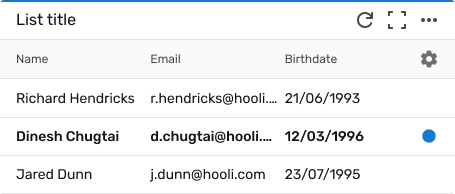
Your list widgets now come with visual read and unread indicators, making it easier to see where you have missed updates on items since you last opened them; just like your inbox.
When you have enabled this feature, which you can do for each list widet, items with new information are marked with a blue dot and slightly bold text. You can mark it as read without opening the item by clicking the blue dot and the same action will also mark it as unread again if needed.
A new and simple way to stay on top of changes without having to open every item.
🦋 Improvements
- Link multiple existing items at once to streamline one-to-many and many-to-many relationships, like employee and team
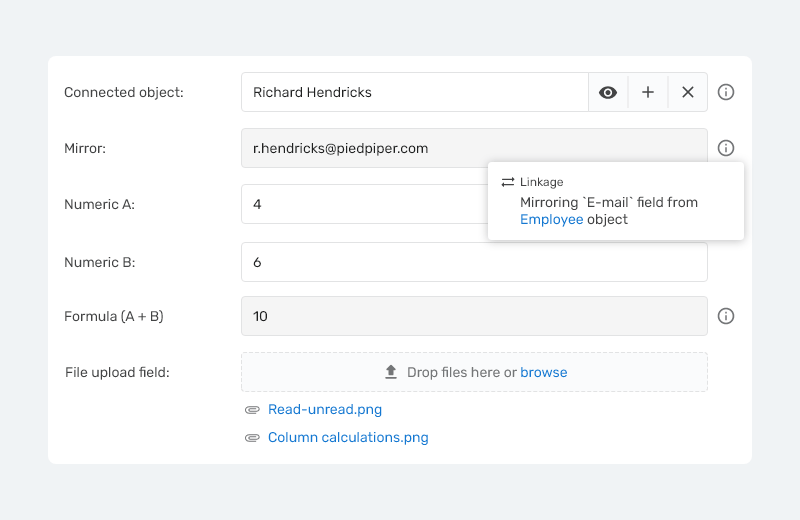
- For the mirror field, you can now optionally edit the linked item data without navigating away
- Improved file previewing reliability for the file tab and field
- Upgrade the branded experience for your portal users with your own domain, email, and custom login and maintenance pages
- Configure useraccount fields to only show users with selected roles, making selection faster and more relevant
- The log widget now supports not only create, but also update and read actions, with filters by action type and the option to show only your own activity
🪲 Bug fixes
- Tagging a user no longer triggers old tag notifications
- The "contains" empty operator in user account fields now returns correct results
- Bullets are properly displayed again in unordered lists within large text fields
- Prevented new items to be minimized until they are saved for the first time
- File previewer now renders correctly on mobile devices
- Special characters are now correctly displayed in dynamic titles
- Commas are no longer allowed in choice field options to maintain data quality
- Selecting specific fields during item export works correctly again
- Fixed multiple instances where unsaved changes warnings appeared unnecessarily