June 2026
Saving overhaul, reusable choice lists & more
A new way to save, with save and close
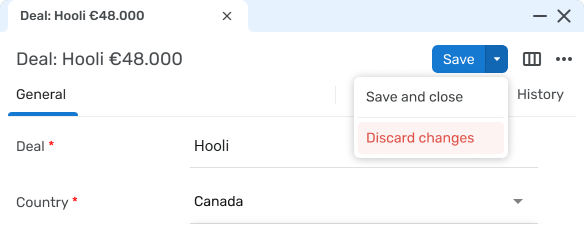
Saving is something you do dozens of times a day, so it's worth getting right. The save icon becomes a proper save button, easier to spot and harder to miss, and it now doubles as a dropdown. Click the arrow next to it and you'll find two more actions: save and close, which writes your changes and takes you straight back out of the item in one step, and discard changes, which drops your unsaved edits (after a quick confirmation, so an accidental click can't cost you anything).
And now that saving lives in a button with a dropdown, we've got room to grow it. This is the foundation for more saving options down the line.
Reuse the same choices everywhere with choice lists
If you've ever set up the same set of choices on more than one field, you know the maintenance that comes with it. A list of departments, a set of priorities, your sales stages, typed out again on every field that needs them, and re-typed on every field whenever one option changes. Miss one and your data quietly drifts out of sync.
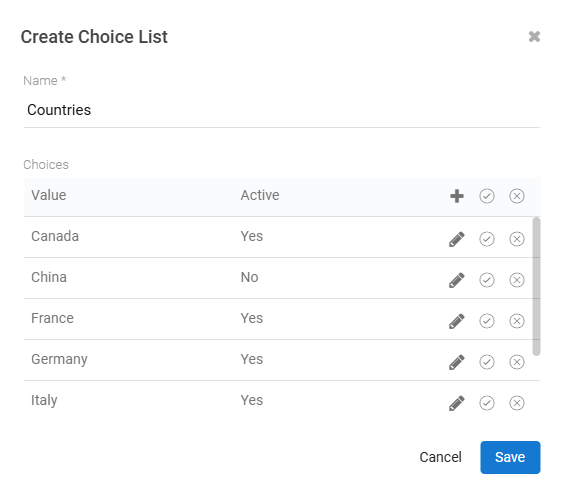
With choice lists you define a set of choices once and reuse it across as many choice fields as you like. Update the list in one place and every field that uses it follows along. Take a country list: the same long set of options, maintained separately on addresses, on customers, on shipping details. As a choice list it becomes one source of truth that every one of those fields draws from.
It's the kind of groundwork that pays off most as your configuration grows, and we're eager to see how you put it to work.
🦋 Improvements
- Notification emails now come from our noreply address instead of info, with replies routed to support. If you've filtered notifications on the old info address, point those filters at the new sender.
- The item modal now supports up to five split-view panels, up from three. The extra layouts live under "show more" in the split-view selector.